Account verified

You may now log in normally.

Log in to ORBIT

For crew. For the people they love.

You fly.
They stay close.

ORBIT brings crew schedule sharing, family flight updates and a personal travel globe together. Share your journeys with the people you love.

See how family updates work

Automatic flight alerts require sign-in, an eligible account, a supported flight and remaining allowance. Delivery depends on provider coverage and enabled device notifications. See availability

The ORBIT globe with golden city lights, navy oceans and a blue atmosphere
ORBITOur signature globe

Follow

For family and friends

Stay close, wherever they fly.

Follow the journeys of the people you love. See the flights they share and choose takeoff and landing updates.

Explore Follow

Their flight, a glance away. See Live Activities on your iPhone Lock Screen and CarPlay Dashboard. See it in action

ORBIT · PeopleExample
YYZLHR

Alex’s journey · Toronto to London

Alex’s flight is airborne

Toronto → London

Alex’s flight has landed in London

Arrived in London

Illustrative flight updates. Timing depends on flight reports and your device’s connection.

Globe Atlas

For travelers, crew and aviation enthusiasts

Every journey, on your globe.

Keep track of where you’ve been. Add places and past flights, trace your routes and put your travel history on display.

Explore Globe Atlas
The ORBIT Atlas with sample journey routes and saved places around the globe
Sample journeys. Make it yours with the places you’ve been.

Start here

A guide for your next step.

How family updates work in the beta

Schedule sharing is available in People. Signed-in beta users can connect automatic takeoff, delay and landing alerts for supported flights within their remaining allowance. Check that each flight’s alerts are connected before relying on an update.

Each person needs an ORBIT account and notifications enabled on a supported device. On iPhone and iPad, use the ORBIT app or add the web app to the Home Screen. Send a test notification during setup.

Roster imports are reviewed before saving. They are not a continuous connection to your airline’s roster. Takeoff, delay and landing updates use reported flight events. Delivery can be delayed or unavailable when flight data or connectivity is missing.

Can I explore ORBIT without an account?

Yes. Add countries, cities and past flights to your Globe Atlas, explore globe styles and try display mode in your browser. Guest data stays in that browser, so make a backup before clearing it or switching devices. Sign in for schedules, sharing and supported account sync; live flight services have additional eligibility and usage limits.

Do I need an ORBIT display?

No. Use ORBIT on iPhone, iPad or in your browser, and try display mode on a tablet or computer you already own. ORBIT Frame, Mini, Pro and Globe hardware remain in development and are not for sale. Specifications, pricing and availability are unannounced.

HardwareA home for your world. Discover ORBIT Frame

Live Activities · iPhone + CarPlay

Their flight. With you.

From your Lock Screen to the drive there. Keep a loved one’s flight in view on iPhone and CarPlay.

Explore Live Activities

On your iPhone

Right on your Lock Screen.

Real iPhone Lock Screen showing ORBIT’s AC844 Live Activity from YUL to FRA with flight status, arrival time and progress
Actual iPhone capture View full capture

In your car

The drive there.
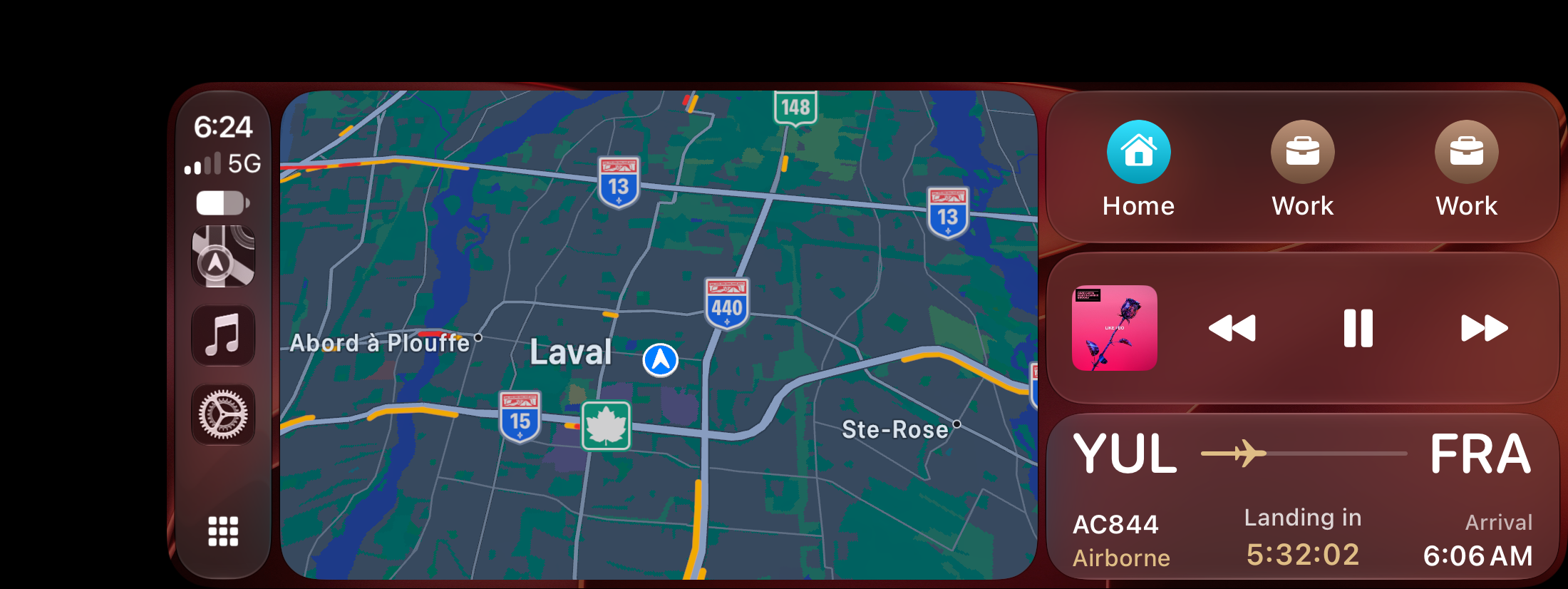
The flight in view.

Real CarPlay Dashboard with navigation, music and ORBIT’s landing countdown for AC844 from YUL to FRA
Actual CarPlay capture View full capture

The landing countdown, up close.

Enlarged detail from the same CarPlay capture: AC844 airborne, landing in 5 hours 32 minutes, arrival 6:06 AM
Flight status, time to landing and arrival time, alongside your navigation. Detail enlarged from the same capture.

Picking up someone you love?

Open their flight in ORBIT and choose Start Live Activity.

See how it works

Available in compatible TestFlight builds, on compatible devices with Live Activities enabled. Flight details depend on available data. See beta availability

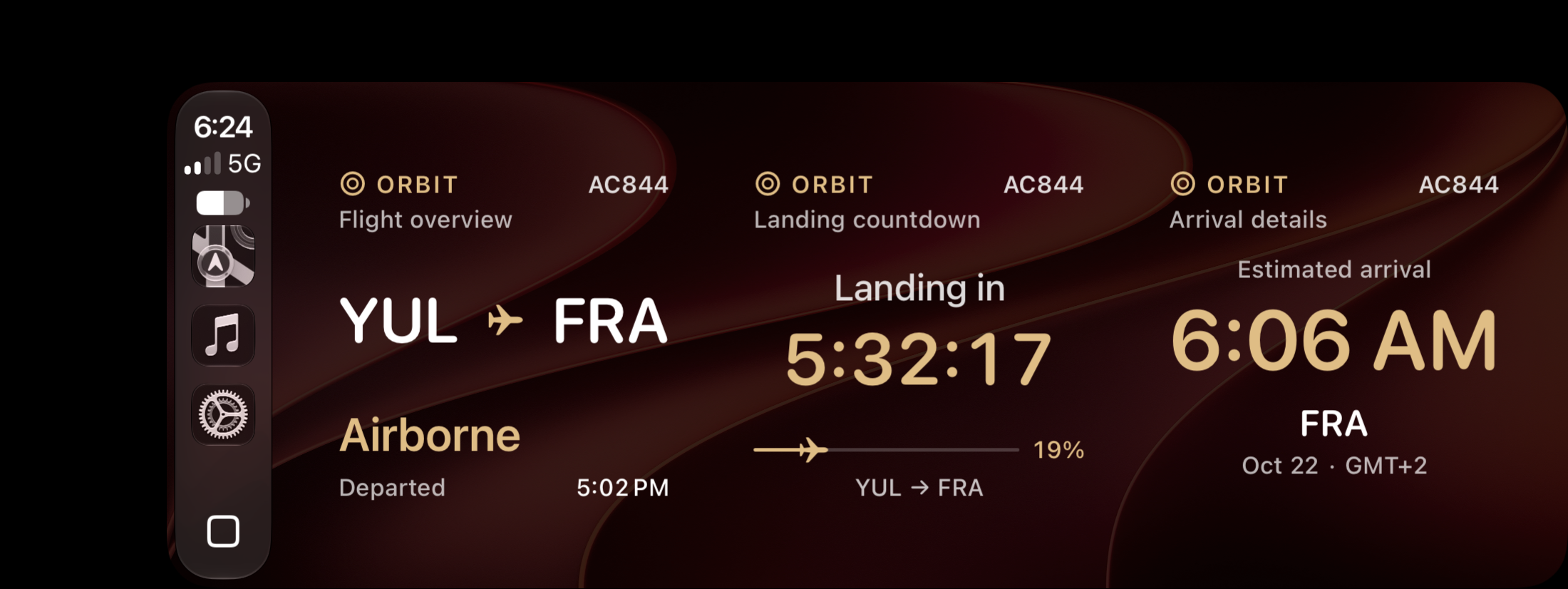
CarPlay widgets · In beta

Three widgets.
One flight.

Flight overview, landing countdown and arrival details, together on your CarPlay widget page.

Explore the three-widget page
Actual CarPlay widget page showing AC844 from YUL to FRA: flight overview, landing countdown and arrival details
Actual CarPlay capture · Three separate ORBIT widgets. Layout varies by display. View full capture

Start with the app

Bring your world into ORBIT.

Follow someone you love or start building your Globe Atlas. Explore ORBIT on iPhone, iPad or in your browser.

No account needed to explore the browser app.